Categories
Programming

Automating PaintScratch’s Shopify Theme Updates with AI: A Solo Developer’s Workflow

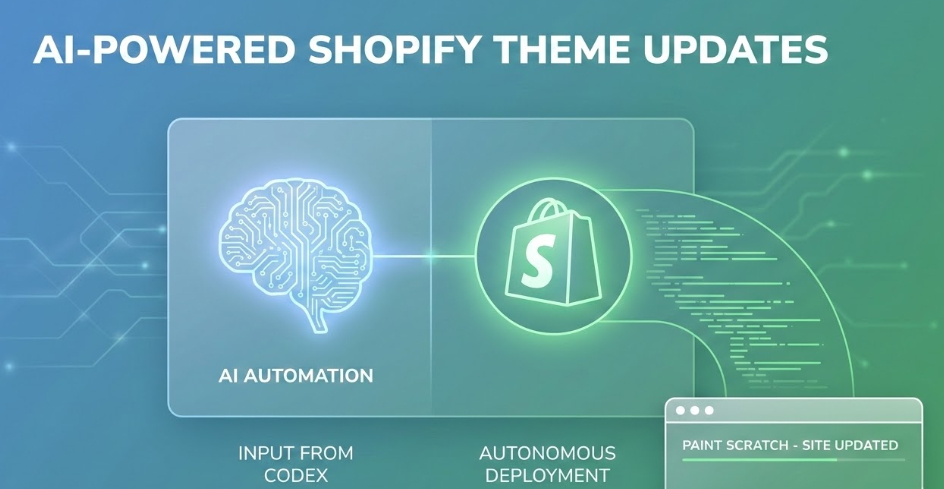
As a solo developer running PaintScratch, managing our Shopify store’s frontend alongside everything else can be a massive time sink. To speed up development and deployment, I’ve been refining a hands-off, AI-driven workflow that actually writes, tests, and deploys code for me.

If you’re curious about how AI can practically speed up real-world e-commerce development, I recorded a behind-the-scenes look at my exact process.

How the Workflow Actually Works

In the video, I walk through a real UI/UX update for the site. Instead of manually digging into Shopify’s Liquid files and CSS, here is how I pass the heavy lifting off to AI:

  • Step 1: Planning with ChatGPT. I take the design feedback and screenshots, feed them into ChatGPT, and ask it to generate a strict implementation plan. I review it to make sure the logic is sound.
  • Step 2: Autonomous Coding with Codex. I pass that plan into the Codex desktop app for Windows. From there, Codex takes over. It pulls from my GitHub development branch, makes the necessary code changes, and commits them.
  • Step 3: Automated Browser Testing. This is where it gets really useful. Codex uses a Playwright headless browser to visually inspect its own work on a live development server. (I use a Cloudflare routing system so that my dev environment automatically previews my active Shopify development branch).
  • Step 4: The Iterative Loop. If Codex sees that the UI doesn’t match the plan, it goes back, edits the code, pushes again, and re-checks the browser. It iterates autonomously until it’s ready for my final human review.
  • Step 5: Merging to Production. Once I review the final pull request and approve the visual changes, I merge it, and the updates go live on PaintScratch.

It’s not 100% perfect yet—there is still a “human-in-the-loop” element required to catch minor spacing or color issues—but it completely changes the speed at which I can ship updates to the store.

Categories
Education & AI

Teach the Right Struggle: AI as an Exoskeleton for Kids

Parents are stuck in a bad choice. Let kids use AI freely and risk turning school into copy paste, shallow focus, and helplessness when the tool is wrong. Ban AI and risk teaching in a world that no longer exists, where kids spend years grinding skills that may not matter much anymore.

I think there is a third path, but it is not just “do things manually first.” It is more selective than that: teach the right manual skills, skip the rest, then use AI as a power tool on top of that foundation. The goal is not to preserve every old method. The goal is to build the human abilities that let a kid steer AI, judge its output, and recover when it fails.

I am writing this as a parent of three elementary school aged kids, a co founder of Ketshop (where kids learn money by living through earning and spending), and a member of the Tahoe Truckee Unified School District AI Board Policy Work Group.

TLDR

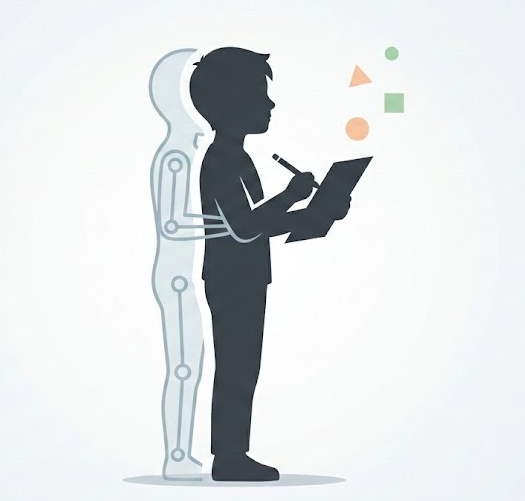
AI should work like an exoskeleton. It should amplify skills kids already have. So the job of education is to choose the manual skills that build real judgment and independence, then stop drilling once those skills are there.

What I learned from the people sounding the alarm

A few voices have been especially helpful for me in thinking this through.

Nate B. Jones, an AI professional, argues that kids should do real work on paper first, then use AI to build things and learn how to give clear instructions. A Fortune piece makes a broader claim that when schools replace too much reading and writing with screens and edtech, student focus and outcomes can suffer. And researchers have been studying related questions from different angles, like how handwriting and typing engage the brain differently, and how reliance on AI can cause “cognitive offloading,” where the tool repeatedly does the hard part and the student loses skill over time.

Those sources do not all agree on every detail. But they point to the same core risk: if we let tools do the thinking too early, we should not be surprised when kids struggle to think without them.

The Exoskeleton Model, updated

AI is not just another app. It can produce finished looking work on demand. That changes the temptation. A kid can skip the part where learning actually happens: the first struggle, the false starts, the revision, the check your work moment.

So I agree with the direction of the alarm, but I want to tighten the prescription.

The question is not, “Should kids do things manually first?”
The better question is, “Which manual skills are worth the time because they make AI safe and useful, and which ones are mostly tradition?”

If we treat every old method as sacred, we waste time and create resentment. If we treat AI as a shortcut for everything, we create dependency. The fix is a filter.

The two traps to avoid

  • Nostalgia trap: treat every old method as mandatory. This turns learning into busy work and steals time from higher value learning and building.
  • Autopilot trap: let the tool do the hard part. This creates dependency and weak judgment.

My filter: the “one layer down” rule

You do not need to master every layer under a tool to use it well. But you do need the layer right below the button you are pressing.

That means the manual skills you teach should have a clear purpose. They should help a kid:

  • steer the work (give clear direction),
  • judge the result (spot weak, wrong, or empty output),
  • recover (revise, fix, or try another path).

If a manual skill does not serve those goals, it is a candidate to shorten, simplify, or skip.

The policy that changes behavior

Attempt before augmenting.

This is the same principle we built into Ketshop: you learn faster when you feel the real feedback loop.

Before AI, the kid produces a first pass. Not perfect, just real: a rough outline, a short answer, a plan, a guess plus a quick check.

Then AI is allowed to help: polish, reorganize, suggest options, explain mistakes, help test.

This keeps learning inside the kid while still letting AI accelerate progress.

What this looks like in practice

This is the difference between “manual first” and “manual on purpose.”

Writing
Kids need enough writing experience to know what strong writing looks like, so they can judge and revise what a tool produces. AI can help polish and reorganize, but the kid stays the editor in charge.

Math
Kids need enough math skill to tell when an answer is reasonable, and to notice when something is off. AI can help show methods and explain errors after the kid tries.

Coding and building
Kids can use AI early for building things because building forces decisions and iteration. But they still need to be able to explain what they want, test what they got, and fix what is broken.

Sources I am drawing from

Nate B. Jones: Why My 10-Year-Old Does Math by Hand This is a video by an AI professional explaining his approach to parenting in an AI-driven world. He details how he makes his daughter do math on paper and read physical books to build a strong brain first. Once she does the hard work, he then lets her use AI to actively build things like video games, teaching her how to give the machine very specific instructions rather than letting it do her thinking for her.

Fortune: Why American Schools are Broken This article explains the negative impact of replacing traditional schoolwork with digital screens and educational tech. It points out that when schools removed physical books and paper in favor of tablets, students’ reading and math scores plummeted. It serves as strong proof that removing the natural “struggle” of analog learning actually harms a child’s ability to focus and retain information.

Frontiers in Psychology: Handwriting vs. Typewriting (2024) This is a scientific study where researchers measured brain waves to see the difference between writing and typing. They found that carefully forming letters by hand activates large, interconnected networks in the brain that are responsible for memory and learning. Typing on a keyboard requires very little brain power and does not create these same important pathways, showing why kids still need to write with a pen.

The Cognitive Paradox of AI in Education (2025) This research paper looks at what happens when students rely on artificial intelligence too early in their education. It explains a concept called “cognitive offloading,” which means the brain gets weaker when a machine does the heavy lifting. The study warns that if kids don’t learn how to struggle through problems on their own first, they will eventually lose the ability to do complex, independent thinking.

The point, in one sentence

Teach kids to be directors: build the right manual skills, skip the rest, require a first attempt, then let AI amplify what they can already do.
Categories
Programming

Making Database Queries More Secure with PDO

Part of the work I do here is building custom web applications that users can interact with. A recent one is a simple feedback form that enables visitors to a client’s website to send quick suggestions. It looks like this:

suggestions comments


Once someone enters their suggestion and clicks “Send,” I use Jquery and Ajax to submit the message to a PHP script which then processes the message, saves it to a MySQL database for later review, and emails it to my client. In just a few weeks, my client has received hundreds of highly valuable and actionable suggestions ranging from praise to notices about serious bugs.

Whenever you allow visitors to submit text through your website, security is a concern that must be dealt with. If you simply grab the message the user submits and send it to your database as-is, you leave an open door to SQL injection where a malicious user can include tricky code in their message that makes your database do nasty things.

Enter PHP Data Objects (PDO) and Prepared Statements. The beauty of these is that malicious visitors can include all the nasty tricky code they want in their message, but the database will never try to execute it because the message is kept completely separate from the commands. The best plain English explanation I’ve seen comes from an answer to a stackoverflow.com question and reads as follows:

When a query is sent to a data base, it’s typically sent as a string. The db engine will try to parse the string and separate the data from the instructions, relying on quote marks and syntax. So if you send “SELECT * WHERE ‘user submitted data’ EQUALS ‘table row name’, the engine will be able to parse the instruction.

If you allow a user to enter what will be sent inside ‘user submitted data’, then they can include in this something like ‘…”OR IF 1=1 ERASE DATABASE’. The db engine will have trouble parsing this and will take the above as an instruction rather than a meaningless string.

The way PDO works is that it sends separately the instruction (prepare(“INSERT INTO …)) and the data. The data is sent separately, clearly understood as being data and data only. The db engine doesn’t even try to analyze the content of the data string to see if it contains instructions, and any potentially damaging code snipet is not considered.

So great, you are thinking, if I use this complicated PDO thing with database queries I can make my website really secure and no longer have to use a bunch of cumbersome data sanitizers. Thats exactly where I was not long ago, but then I found a great series of videos on YouTube that showed exactly how it all works. The only gripe I had with the series is that it was hard to figure out which order to view them in, so with that in mind, here they are in order:

Categories
Founder Thoughts

I’ve been a web marketer for 25+ years?!

Greetings and welcome to the Collins Harris LTD blog. We officially got started in 2012 when we incorporated in Nevada, but founder Nick Harris (me) has been active and successful in web marketing since the late 1990s.

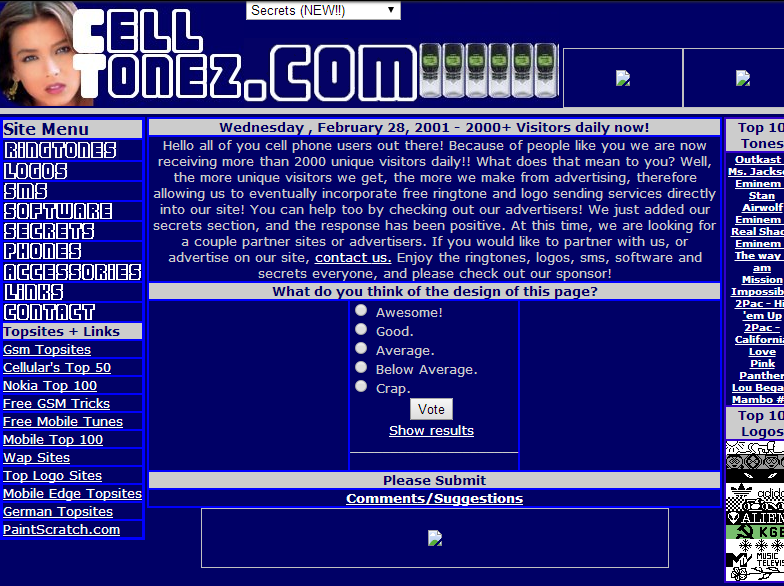
That actually reminds me of one of my first web marketing projects that I started and ran back in high school:  a cell phone customization website called celltonez (now defunct). Looking back on it evokes about the same mixture of embarrassment and pride that looking back at ones high school yearbook photo does. But the site actually generated a lot of traffic (upwards of 2,000 unique visitors daily) and I managed to make a pretty sizable amount of ad revenue. Some of the details about how I managed to generate that level of traffic are pretty hilarious/quasi-shady… ask me over a beer sometime and maybe I’ll share! Weekends were especially lucrative, and I remember returning from soccer practice or windsurfing with my dad on Saturdays and Sundays to see what at that time seemed like ridiculous amounts of cash in my advertiser account. Here is a screenshot from early 2001 of celltonez.com, a babe as part of my logo and all!

What founder Nick Harris was up to back in his high school days

I’m actually kind of shocked to realize that I’ve been involved in web marketing for a quarter of a century now. But at the same time, my early success with celltonez proved to me that there was and still is a vast opportunity to utilize the internet to sell products and services.

I’ve launched and run a number of companies in the years since, but the one thing I’ve always excelled at is driving traffic and revenue with online marketing.  It has never been just about creating a website for me; it is always first about figuring out who the customer is, what they want, and then how to create a website that caters towards them and produces results.

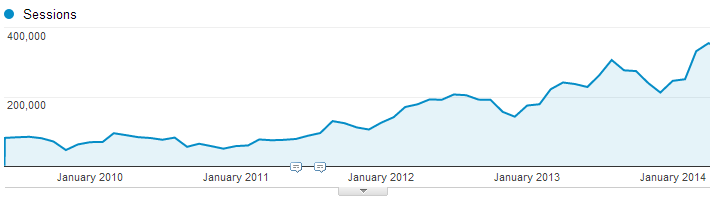
In recent years, some of my most successful work has been driving traffic via a combination of inbound marketing techniques and business development. One client had seen stagnant traffic and declining sales for several years, and then I got involved in the middle of 2011 and over the course of several months managed to do this:

Nick's impact on traffic for a client


Sales and profits are up nearly 3x for this client since I first became involved and we continue to launch new traffic and conversion increasing initiatives. The arrangement has worked out so well that we only charge them based on performance, and everyone is quite pleased.

So this brief history of my life as a web marketing professional leads up to where I am and we are as a company now. We’ve got successful projects accomplished and under way, but are striving to go a whole lot further. Launching new world-changing companies, partnering in success with awesome entrepreneurs, and continually learning are the future I envision. The purpose of this blog is to share what I learn along the way. With that, I conclude this first post and look optimistically towards the future.